
Opening
Speed and acceleration
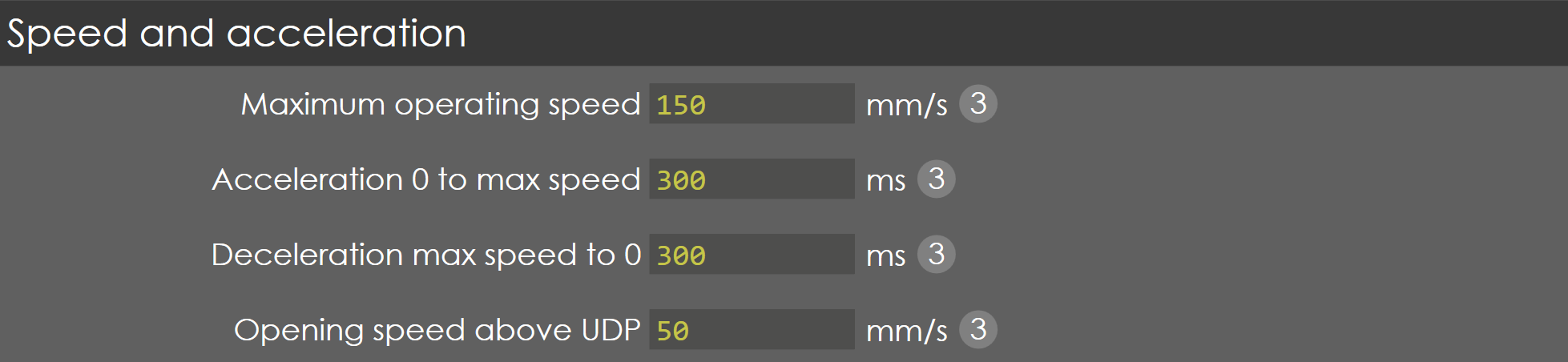
Maximum operating speed
Range |
0-500 |
Default |
159 |
Units |
mm/s |
Access |
Administrator |
Function
This parameter defines the maximum travel speed of the Y-axis during opening.
Description
During opening, the suction valves are opened, and the beam is ready to move up against the gravity, when the proportional valves are opened. Normally this value should be programmed to the maximum possible speed of the axis, when the control signal is at maximum.
Acceleration 0 to max speed
Range |
0-2000 |
Default |
300 |
Units |
ms |
Access |
Administrator |
Function
This parameter defines the acceleration time of Y-axis during opening.
Description
This is the nominal acceleration of the axis, used to control the axis from zero to maximum speed in the opening phase. This parameter must be programmed as the time in which the axis accelerates from zero to maximum speed.
Deceleration max speed to 0
Range |
0-2000 |
Default |
300 |
Units |
ms |
Access |
Administrator |
Function
This parameter defines the deceleration time of Y-axis during opening.
Description
This is the nominal deceleration of the axis, used to control the axis from maximum to zero speed when axis comes to its position in the opening phase. This parameter must be programmed as the time in which the axis decelerates from maximum to zero speed.
Opening speed above UDP
Range |
5 to 100 |
Default |
60 |
Units |
mm/s |
Access |
Service |
Function
This parameter defines the opening speed above Upper Dead Point (UDP).
Description
This is the speed programmed to move the beam above the UDP to the Top Dead Centre (TDC) point. For instance, if the programmed UDP position is 30mm and the TDC position is 10mm, then the beam is moved from 30mm to 10mm at this speed.
Gain
P-gain
Range |
0.1 - 99.9 |
Default |
8 |
Units |
NA |
Access |
Administrator |
Function
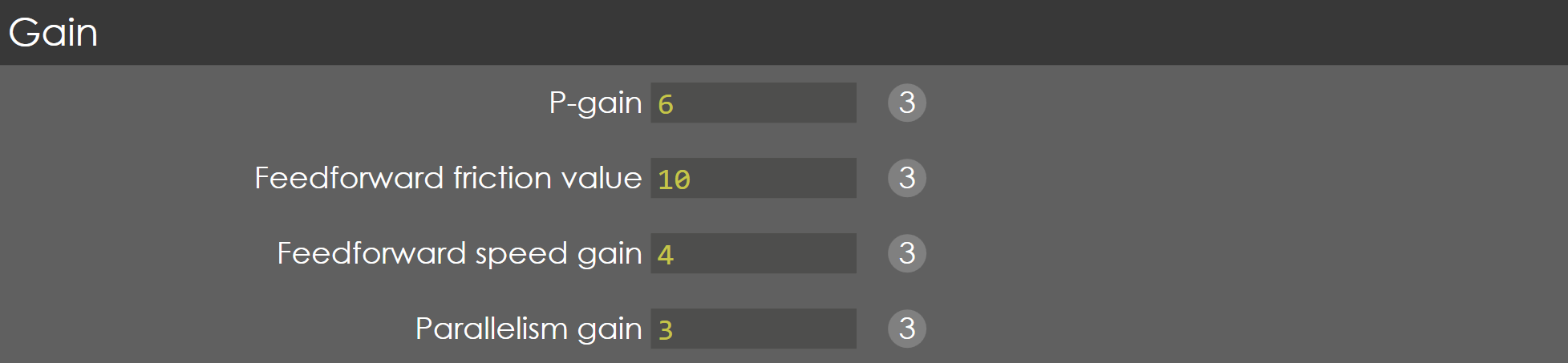
This parameter defines the Proportional gain factor of Y-axis during opening phase.
Description
This gain factor defines the response to changes in the control signal. A high gain gives a quick response, if the gain is too high it will cause oscillation.
Feed forward friction value
Range |
0-999.9 |
Default |
60 |
Units |
NA |
Access |
Service |
Function
This parameter defines the gain factor for braking of Y-axis during opening phase.
Description
To set gain factor for the axis when approaching the programmed position for a quick and smooth approach to UDP.
Feed forward speed gain
Range |
0-999.9 |
Default |
8 |
Units |
NA |
Access |
Service |
Function
This parameter defines the gain factor for reducing the lag error of Y-axis during opening phase. Thereby the beam follow the computed cycle more accurately.
Description
By increasing this gain, the beam will follow the computed cycle more accurately. It is recommended not to set this value too critically. A tracking error between 2 and 4 mm is a good practical value in opening phase.
Parallelism gain
Range |
1-1000 |
Default |
5 |
Units |
NA |
Access |
Administrator |
Function
This parameter defines the gain factor for parallelism control of Y-axis during opening.
Description
The parallelism during opening can be adjusted with this parameter. A higher value will result in a smaller difference between Y1 and Y2 during the movement. In practice this difference should be approximately 0.1 - 0.5 mm.
| Programming this value too high will result in unstable movement of the beam. |
General
Delay before opening
Range |
0-2000 |
Default |
200 |
Units |
ms |
Access |
Administrator |
Function
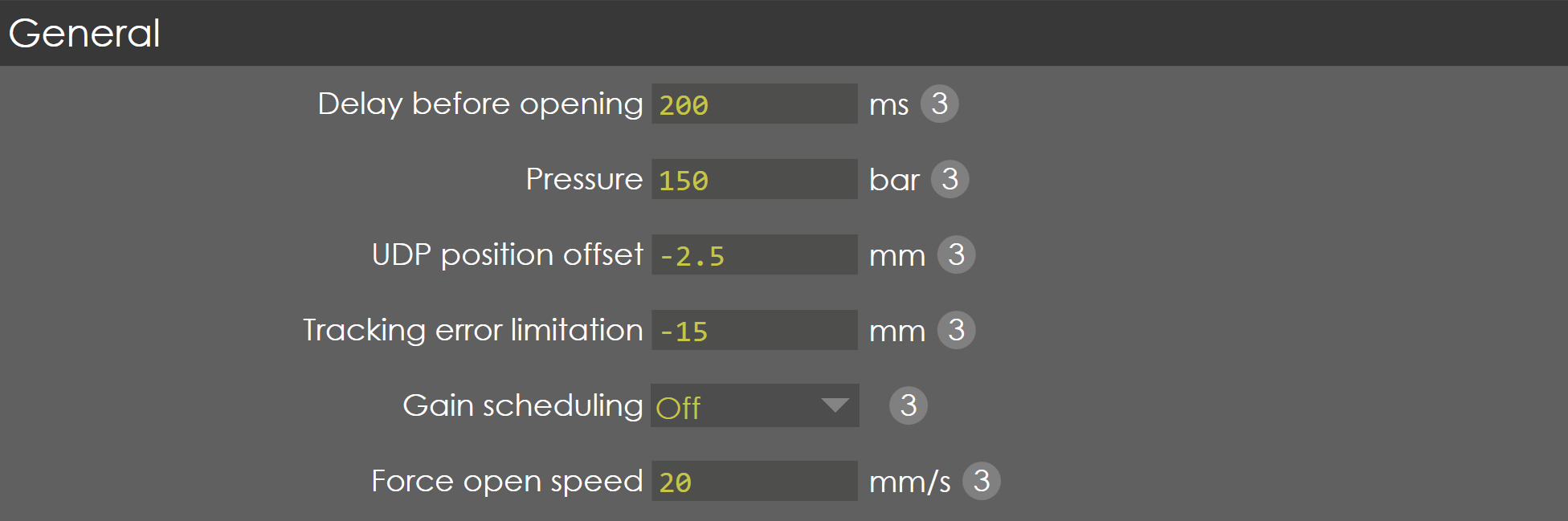
This parameter defines the gain factor for parallelism control of Y-axis during opening.
Description
When the open command becomes active, the proportional valves will not be opened until this delay time has elapsed, to make sure the synchronized start of beam speed after the opening of suction valves on either side.
Pressure
Range |
1-1000 |
Default |
150 |
Units |
Bar |
Access |
Administrator |
Function
This parameter defines the pressure required during the opening phase.
Description
This is the minimum pressure required to move the beam up against the gravity.
| Make sure that the value for this parameter is high enough! If it is too low the beam will not move. This is a dangerous situation! When after switching on the machine and start referencing, the beam will not move upwards, then the control sets referencing via down movement. When the beam is below its reference point it will come down without finding its reference when a closing command is given. This can damage the tools. |
Therefore, it is recommended to set the minimum value of 35% of maximum pressure.
UDP position offset
Range |
-9.99 to 9.99 |
Default |
-2 |
Units |
mm |
Access |
Administrator |
Function
This parameter defines the offset to programmed UDP position.
Description
Normally, the UDP output becomes active when the beam reaches the UDP position. The gain factors of opening parameters are tuned in such a way that while approaching the UDP position, the RAM slow down and reaches the point. This will take more time to reach the UDP position.
In order to decrease the bend cycle time, the activation of UDP output is made certain distance below the programmed UDP position. This distance is the UDP position offset and can be programmed in this parameter.
Tracking error limitation
Range |
-50 to 100 |
Default |
-12 |
Units |
mm |
Access |
Service |
Function
This parameter defines the maximum allowed difference between the computed position and actual position, during opening.
Description
During the opening phase, the controller will try to match the commanded and actual position as accurate as possible. The tracking error also called as lag error, is the difference between the commanded and actual position. The limitation here is the maximum tracking error allowed during opening.
Gain scheduling
Range |
ON / OFF |
Default |
ON |
Units |
NA |
Access |
Administrator |
Function
This parameter enable/disable the gain scheduling function during opening phase.
Description
Generally, the gain factor parameters of opening phase are tuned with the maximum open height distance to get a smooth profile of axis motion. When the UDP distance is small, still the same gain factors are valid, but the motion may not be smooth. By activating this function, the gain factors are dynamically changed with respect to distance to get better motion profiles.
Force open speed
Range |
1 to 100 |
Default |
20 |
Units |
mm/s |
Access |
Administrator |
Function
This parameter specifies the speed at which the RAM moves when the tool is unclamped or auto clamping.
Description
This is set to ensure RAM does not move fast when the tool is not clamped or is clamping.
Pump

Pressure at end of opening
Range |
0 to 300 |
Default |
0 |
Units |
Bar |
Access |
Administrator |
Function
At the end of Opening phase, after reaching the UDP the pressure goes to 0 ,the Servo pump tries to rotate in opposite direction due to reverse flow of Oil from the line this process may damage the Pump in future. Hence at end of opening this pressure is maintained to avoid this problem.
Description
| This parameter will be available only if Pressure control type in Y-Axis Parameters → Pressure valve is set to Servo motor. |
Dwell at end of opening
Range |
0 to 100 |
Default |
0 |
Units |
Sec |
Access |
Administrator |
Function
At the end of Opening phase, after reaching the UDP the pressure goes to 0 ,the Servo pump tries to rotate in opposite direction due to reverse flow of Oil from the line this process may damage the Pump in future. Hence at end of opening a pressure (pressure at end of opening) is maintained for this set time period to avoid damage to pump at end of opening.
Description
| This parameter will be available only if Pressure control type in Y-Axis Parameters → Pressure valve is set to Servo motor. |